

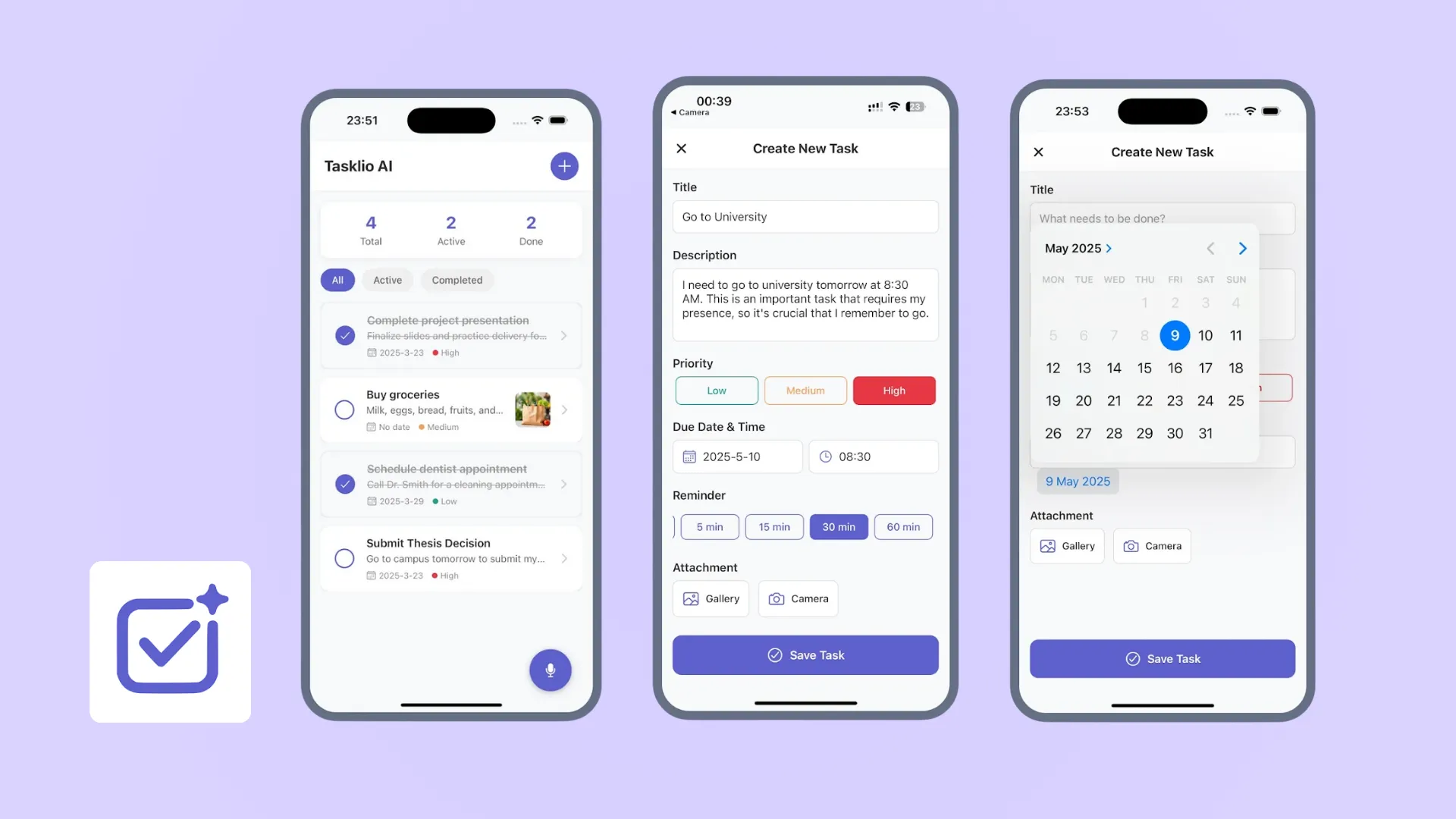
Tasklio AI: Your Smart Personal Task Assistant
Project Overview
In a world of constant distractions, traditional to-do lists often become cluttered graveyards of unfinished business. Tasklio AI was built to solve this "productivity paralysis." It is not just a list; it is an intelligent assistant that helps users capture, organize, and execute tasks with minimal friction. By integrating Voice AI and Smart Prioritization, Tasklio transforms task management from a chore into a seamless daily habit.
The Challenge
While there are thousands of productivity apps on the market, most suffer from two critical flaws:
1. High Input Friction
Capturing a task usually requires opening an app, clicking a button, typing a title, setting a date, and selecting a priority. This multi-step process is too slow for on-the-go users, leading to forgotten ideas and missed errands.
2. Lack of Focus
Standard apps present long, flat lists of tasks that can feel overwhelming. Users struggle to identify what actually needs to be done today versus what can wait, causing "decision fatigue" and stress.
Our Solution: Frictionless Capture & Smart Organization
We designed Tasklio AI to be the fastest way to get a task out of your head and into a system you trust.
🗣️ Voice-First Architecture
We integrated advanced Speech-to-Text capabilities to remove the barrier of typing. Users can simply tap the microphone icon and speak naturally (e.g., "Remind me to submit the project presentation tomorrow at 10 AM"). The app parses this intent, automatically extracting the due date, time, and content.
🧠 Intelligent Prioritization
Tasklio forces clarity through a simplified priority system (Low, Medium, High). Instead of a cluttered list, users are encouraged to tag tasks by urgency, ensuring that critical items—like university submissions or work deadlines—always float to the top.
📊 Visual Progress Tracking
To combat overwhelm, we built a Visual Dashboard that provides an instant "Health Check" of the user's day. A clean counter shows Total, Active, and Done tasks, giving users a dopamine hit as they see their "Active" count drop and "Done" count rise.
Key Features
🎙️ Quick Start Voice Input
The "Just Say It" feature allows users to dictate tasks instantly. The AI transcribes the audio with high accuracy and adds it to the list immediately, making it perfect for capturing ideas while walking or driving.
📅 Seamless Calendar Integration
Tasklio doesn't live in a silo. We built a robust Calendar Integration that syncs tasks with the user's native device calendar. Deadlines set in Tasklio automatically block out time on your schedule, ensuring realistic planning.
🔔 Smart Reminders
The app features a "Never Miss a Thing" notification engine. Users receive timely nudges based on their preset deadlines. Unlike passive alarms, these reminders are context-aware, prompting users at the exact moment action is needed.
📎 Rich Context Attachments
Productivity often requires context. We added the ability to attach photos and documents directly to tasks. Whether it's a photo of a bill to pay or a PDF reference for a thesis, all necessary materials are kept right alongside the to-do item.
Technical Implementation
Tech Stack
- Frontend: React Native for a fluid, 60fps mobile experience on iOS and Android.
- AI Engine: OpenAI Whisper API for near-perfect voice transcription and intent parsing.
- Backend: Firebase Realtime Database for instant sync across devices.
- Native Modules: Custom bridges for deep integration with iOS/Android Calendar and Notification systems.
Results & Impact
Tasklio AI has successfully streamlined the daily workflow for its users.
- 40% Faster Task Entry: Voice input reduced the average time to create a task from 15 seconds to under 5 seconds.
- Higher Completion Rates: Users utilizing the "Priority" feature completed 25% more high-value tasks compared to standard list users.
- Reduced Cognitive Load: The visual dashboard received high praise in user testing for reducing anxiety by clearly separating "Today's Work" from the backlog.